
Trezor in 2026: an overview of the open-source wallet range
Trezor, from SatoshiLabs in the Czech Republic, is an established hardware-wallet manufacturer associated with open-source self-custody. A signing device lets you control keys separately from an exchange account, while making you responsible for recovery and transaction approval. This can suit readers who value software inspectability and direct control. It also changes the failure modes: a lost backup or an unsafe approval may have consequences that an exchange support team cannot resolve.
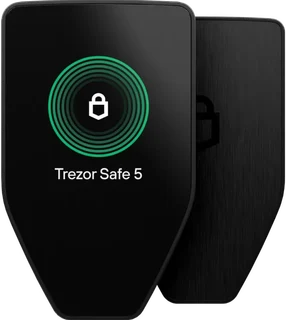
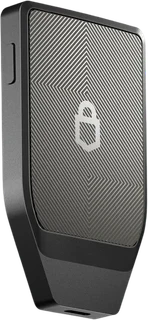
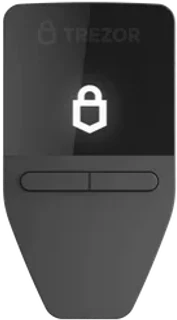
The reviewed range includes Safe 3, Safe 5 and Safe 7. Safe 3 uses physical buttons; Safe 5 adds a color touchscreen; Safe 7 combines a larger color touchscreen with wireless connectivity and a different chip architecture. These differences matter for the way you sign and the computer or phone you use. The model list shows the manufacturer's USD base offers observed on October 1, 2026; compare them with the current checkout price. Buying a hardware wallet is the start of a backup and approval process, not the end of the work required for self-custody.
In everyday use, you may buy or trade through an exchange and then manage your own assets with the wallet. To assess the trading account, use the exchange comparison. For the signing device itself, the wallet comparison is a useful starting point. This review examines Trezor's approach, practical features and limitations without claiming that every model or workflow has the same capabilities.
Trezor security: open firmware, Multi-share backup and limits
The ordinary signing workflow keeps private-key operations on the device rather than giving the host computer the keys. Device confirmation provides a separate place to inspect supported transaction details, which can help when the host software is compromised. Trezor publishes wallet firmware and hardware-design information for review. That supports independent scrutiny, but the scope of openness differs between firmware, published designs and individual chip components. Public source is useful evidence, not a guarantee that no vulnerability exists.
Multi-share backup uses SLIP39 to create recovery shares with a chosen threshold. For example, a two-of-three setup requires any two intact shares to recover access, while one share alone is insufficient. This can reduce dependence on a single location if the shares are stored separately and the threshold is understood. Plan the locations and recovery procedure before funding the wallet. Multi-share backup is different from dividing a conventional BIP39 phrase into pieces yourself; the formats and recovery requirements are not interchangeable.
The current Safe range includes Secure Element protection. Safe 7 adds the auditable TROPIC01 alongside another Secure Element, while Safe 3 and Safe 5 have different designs. Avoid applying a historical observation about older Trezor devices to every current model. Physical device protection, backup confidentiality and transaction approval address different threats. A PIN does not protect a recovery phrase that an attacker has obtained, and neither chip certification nor open firmware makes phishing harmless.
Setup and first steps: prepare recovery before funding
Official Trezor Suite instructions guide connection, firmware installation, device access protection and creation of recovery material. Verify the device and software through the manufacturer's current procedure. The organizational part matters just as much: decide how the backup will remain confidential, intact and accessible when you need it. Losing the necessary recovery material can remove access, while exposing it can give another person control. This is different from resetting an ordinary website password.
Keep recovery words and shares off screenshots, cloud notes and routine copy-and-paste workflows. Use appropriate physical media and plan separate storage where it suits your recovery scheme. If you choose Multi-share backup, document the threshold and understand which combinations restore access without exposing the shares in that documentation. A passphrase adds another secret that must remain recoverable; forgetting it can prevent access even when the backup words are correct.
If you are moving from an exchange to self-custody, start with a small transfer on the correct network. Verify the destination through the intended wallet procedure, check receipt and understand the recovery steps before moving a larger amount. Account withdrawal and hardware-wallet recovery have different controls. For choosing a trading service, the exchange comparison can help you evaluate U.S. eligibility and account procedures alongside your separate self-custody setup.
Everyday features: Trezor Suite and supported assets
Trezor Suite manages supported accounts, prepares transactions and connects the signing device to everyday wallet tasks. The interface and transaction display are parts of the approval process, so learn which details appear on the device itself. App convenience does not remove the need to verify the address and transaction type. Some activities use external providers or third-party wallet apps, each with their own permissions, fees and U.S. availability requirements.
Asset support depends on the exact model, edition, network and app integration. A headline count of coins and tokens does not mean that every asset has identical features or transaction visibility. Choose a universal model when you need supported non-Bitcoin assets, and check the current compatibility list first. Safe 5's color touchscreen and Safe 7's larger screen can offer different confirmation workflows from Safe 3's buttons. Try unfamiliar asset workflows with a small amount before relying on them for a larger balance.
If you trade actively, consider the trading account and self-custody wallet as separate processes with separate recovery responsibilities. When evaluating staking or other reward services, weigh network, provider, permission and tax risks alongside any prospective rewards. A signing device does not make an underlying investment or connected service safe. A repeatable approval and backup routine remains relevant regardless of the app's convenience.
Comparing Trezor Safe 3, Safe 5 and Safe 7
Safe 3 offers a compact, button-operated signing workflow. It can suit a reader whose supported assets and platform requirements do not call for a larger touchscreen or wireless connection. Compare its actual U.S. purchase cost with the features you will use; the price in the model list is a dated observation, not a current quote. Prepare the same recovery and transaction-checking discipline you would use with a more expensive model.
Safe 5 provides a color touchscreen with haptic feedback, while Safe 7 uses a larger touchscreen and supports Bluetooth. These differences may matter if you approve transactions frequently or need a particular mobile workflow. They do not eliminate the need to read the prompts. Safe 3 and Safe 5 use USB and have different mobile limitations from Safe 7. Check current model-specific Suite compatibility, especially for iPhone use, before purchasing.
The right model depends on your signing frequency, display preferences, platform and recovery requirements. Each can be useful when its capabilities match a process you understand. Compare the device decision separately from selecting a trading account through the exchange comparison. For device features and the original editorial reference scores, use the wallet comparison.
Trezor and alternatives: who benefits from its open-source approach?
Trezor's approach can appeal to readers who value published firmware and hardware-design information. Other manufacturers use different combinations of open software, proprietary components and device interfaces. Neither approach is automatically better for every person. Compare the actual device architecture, supported platforms, recovery options and transaction display against the threats you expect to face.
An independent comparison should consider how often you sign, how you protect backups and which assets you hold. Marketing claims alone do not show whether a device fits your routine. Phishing resistance also depends on what you approve and whether you verify the destination and transaction details. Published source and chip protection are useful inputs to a decision, alongside a recovery process you can carry out correctly.
The wallet is one part of that process. An unsafe host, weak account protection or a rushed exchange withdrawal can undermine an otherwise careful setup. Use the wallet comparison for device features and the exchange comparison for the trading account. Assessing the entire workflow helps you identify gaps that a device specification alone cannot reveal.
Trezor's advantages and limitations at a glance
Key advantages
- Hardware-wallet history since 2014: A long-established product family with an extensive history of development and public review.
- Published firmware and designs: Open firmware and available hardware-design information support scrutiny; this does not mean every chip in every model is fully open.
- Multi-share backup: SLIP39 offers threshold-based recovery when the required shares are protected and stored according to a considered plan.
- Support for multiple assets: Universal models support a range of assets; verify your exact model, edition, network and app in the current compatibility list.
- Trezor Suite: A dedicated interface for supported accounts, device management and transaction preparation.
- Choice of models: Safe 3 offers buttons, Safe 5 a color touchscreen and Safe 7 a larger touchscreen with wireless connectivity.
Key limitations
- Recovery responsibility: Mistakes in backup storage, passphrase handling or recovery can prevent access or expose funds.
- Learning required: First-time users need time to understand device confirmation, supported apps and the recovery procedure.
- Different chip architectures: Current Safe models include Secure Element protection, but the chips and their auditability differ; older comparisons do not describe every current device.
- No investment return from the device: A hardware wallet protects signing keys; it does not itself generate returns or remove connected-service risks.
Trezor can suit readers prepared to manage recovery and transaction approval carefully and who value public scrutiny of wallet software. It requires more involvement than a service that controls keys for you. Choose a model whose display, connectivity and asset support match your use, then establish the backup routine before committing a substantial balance. Device ownership alone does not establish a sound self-custody process.
Common questions
Frequently asked questions
How secure is Trezor in 2026?
What ongoing fees does Trezor have?
Is Trezor suitable for beginners?
What alternatives to Trezor are available?
How are assets held with Trezor taxed in the United States?
What can Trezor support help with?
Conclusion: Trezor in 2026
Trezor offers a well-established self-custody range with published firmware, threshold-based Multi-share backup and support for multiple assets on universal models. Safe 3 provides button-operated signing, Safe 5 adds a color touchscreen and Safe 7 offers a larger screen and wireless connectivity with a different chip architecture. Check current U.S. pricing and model-specific compatibility rather than treating the dated USD observations as current offers. The principal responsibility remains yours: recovery material and transaction approvals need careful handling. Trezor can suit readers who value software inspectability and a deliberate long-term custody process, provided they are willing to learn and maintain that process.