
BitBox02 in 2026: an overview of the Swiss-made wallet
Shift Crypto's BitBox02 is a Swiss-made hardware wallet aimed at readers who value security processes, privacy controls and inspectable software. Its design emphasizes a dedicated signing device, published firmware and a focused companion app. This approach can suit long-term self-custody users who want to understand how their wallet works. It still requires careful setup and recovery planning; technical features do not remove the need to verify transactions or protect backups.
The hardware combines a Secure Element with a second chip, while the firmware and app development provide opportunities for public review. Reproducible builds help reviewers check the relationship between published code and software binaries. These properties support scrutiny but do not guarantee that every component or build is free of vulnerabilities. No manufacturer USD offer was verified for the BitBox models on October 1, 2026. Check the manufacturer's current U.S. prices, model specifications and shipping terms before ordering.
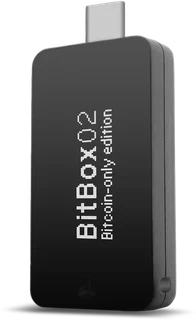
The range particularly suits Bitcoin-focused readers, but the edition matters. The Bitcoin-only edition supports Bitcoin alone; the Multi edition also supports selected other networks and tokens. Neither edition supports XRP or Solana. Check the exact asset list rather than treating a token count as support for every blockchain. For a trading account, see the exchange comparison. For the signing device itself, the wallet comparison places BitBox alongside other models. This review considers its security approach, recovery workflow and practical limitations, with distinctions between the original BitBox02 and BitBox02 Nova.
BitBox02 security: dual-chip design and anti-klepto
The dual-chip architecture separates tasks and uses a Secure Element as part of the protection for sensitive key material. In the ordinary transaction workflow, signing happens on the device rather than handing the private keys to the host computer. That provides a useful boundary against host malware. It does not make every transaction safe: you still need to inspect device prompts, use authentic software and understand the backup and any additional passphrase you rely on.
Anti-klepto addresses a specific cryptographic risk: a malicious signing device can try to leak secret information through carefully chosen signature nonces. The protocol involves the host in nonce construction and verification to reduce that channel in supported signing workflows. This is narrower than a promise that the device or every transaction type is protected against all attacks. Reproducible builds address a different question, helping reviewers compare software binaries with the public source used to build them.
Phishing, unsafe approvals and exposed or lost backups remain practical risks. Use device access protection, check addresses on the signing device and document a recovery process you understand. If you separate trading from custody, make sure both workflows are secure: exchange account recovery and hardware-wallet recovery are different responsibilities. The exchange comparison can help you evaluate the trading account alongside a separate self-custody setup.
Setup and onboarding: the microSD backup workflow
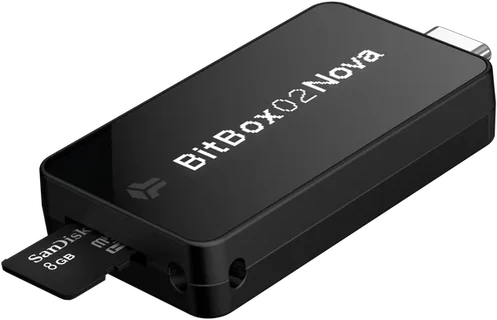
The official BitBoxApp guides pairing, wallet creation and backup. The microSD workflow avoids having to begin with manually transcribed recovery words, although BIP39 recovery words are also available. Crucially, the microSD wallet backup is not encrypted with the device password. Someone who obtains the card may be able to restore the wallet. Remove it after setup and store it securely, apart from the device. Never insert the backup card into an ordinary computer, phone or camera.
Setup includes pairing, device access protection and creation of the backup. Compare the pairing information according to the official instructions instead of confirming an unexpected or mismatched prompt. Touch sliders can take some practice, so work without time pressure and read each confirmation. The original BitBox02 uses USB with supported desktop and Android systems; Nova adds optional Bluetooth for compatible iPhone and iPad use. Choose the model and app version that actually support your platform.
Start with an empty wallet or a small balance, verify the backup workflow and test receiving and sending on the intended network. Increase the balance only after you understand those steps. This staged approach helps reveal setup errors while the consequences are limited. If you also need a trading platform, use the exchange comparison. Keeping account trading and self-custody responsibilities separate can make the recovery and approval steps easier to reason about, but both still need careful operation.
Everyday features: BitBoxApp, Tor and asset support
The BitBoxApp manages accounts and transactions for a narrower range of assets than some competing apps. It also offers optional buy, sell and swap services, a Lightning wallet on phones and a partner insurance offer. The narrower asset range can make the signing process easier to follow, particularly for Bitcoin-focused users. The Multi edition extends support to selected additional assets; the Bitcoin-only edition deliberately does not. Check the precise network and token support before receiving funds. A broad token count can include tokens on one network and should not be read as the same number of independently supported blockchains.
Tor connectivity is a useful privacy option for supported BitBoxApp workflows. It can help reduce direct exposure of your network address to a connected service, but does not make public blockchain transactions anonymous. Address reuse, transaction patterns, account information and the services you use can still reveal information. Treat network routing as one part of a privacy process alongside transaction practices and the choice of infrastructure you connect to.
The touch-slider interface requires a short learning period and supports deliberate confirmation on the signing device. Read the prompts rather than approving by habit. If you are also considering staking or other reward services, evaluate asset support, third-party permissions, fees and risks separately. A hardware wallet is a signing and recovery tool, not a product that promises returns.
BitBox02 compared with Trezor and Ledger
BitBox emphasizes a focused app, open-source firmware and a documented recovery workflow. This may appeal to readers who want to inspect technical choices, while requiring more preparation than an unfamiliar user expects. Compare the scope of published firmware and app code rather than assuming that every secure-chip component is open source. Reproducible builds and public review provide useful evidence, but choosing a wallet still requires decisions about assets, device compatibility and backup storage.
Dual-chip design and anti-klepto address particular parts of the security model. They work alongside device confirmation and physical backup protection rather than replacing them. Asset support is more limited than on some competing products: XRP and Solana are not supported, and the Bitcoin-only edition excludes other networks entirely. That may suit a Bitcoin-only workflow but can rule the device out for a different portfolio. Check the manufacturer's current list before purchasing.
Price is only one part of a self-custody decision. Compare the actual U.S. checkout cost with the device's screen, platform compatibility, supported assets and recovery method. Paying more does not automatically produce a safer operating process. For a view across devices, see the wallet comparison, and for a trading on-ramp or off-ramp, the exchange comparison. Together they help separate the choice of a trading service from the choice of a signing and recovery tool.
BitBox02 strengths and limitations
BitBox02 strengths
- Swiss-made hardware: A focused signing-device design manufactured in Switzerland.
- Dual-chip architecture: A Secure Element forms part of the protection for key operations.
- Open source and reproducible builds: Published firmware and build processes support independent inspection.
- microSD recovery workflow: An alternative to starting with manually transcribed recovery words; the card requires physical protection.
- Tor connectivity: A useful network-privacy option in supported app workflows.
- Anti-klepto protocol: Addresses a specific signature-nonce leakage risk in supported signing workflows.
- Focused companion app: BitBoxApp covers a narrower asset range than some competing apps; its buy, sell, swap and Lightning functions are optional.
BitBox02 limitations
- Preparation for beginners: Recovery and confirmation procedures still require learning and careful setup.
- Limited asset coverage: XRP and Solana are not supported; the Bitcoin-only edition supports only Bitcoin.
- Unfamiliar controls: Touch sliders can require practice before they feel comfortable.
- Purchase cost: Check the current U.S. device price and shipping costs against the features you need.
BitBox can suit users who actively prioritize a documented self-custody process, privacy options and software review. It still requires work: choose the correct model and edition, protect the backup and learn the device confirmations. Readers seeking a signing device for assets outside its supported list will need another option. Its focused design can be useful when it matches your needs, rather than because any feature guarantees complete security.
Who should consider BitBox02?
BitBox is worth considering if you value open-source wallet firmware, reproducible builds and the ability to review technical processes. Bitcoin-focused users may prefer the separate Bitcoin-only edition, while Multi supports a selected wider asset set. Tor connectivity is an additional option for the app's network layer. Decide how those features fit your own backup, transaction and privacy practices rather than treating them as labels that automatically produce a secure setup.
A reader who signs only occasionally still needs a reliable recovery process and familiarity with the controls. If you want the least possible learning effort, compare the setup and approval workflows before buying. For a broad altcoin portfolio, check each network and token individually: BitBox's asset support can be a decisive limitation. Phone compatibility also depends on the model; the original BitBox02 and Nova do not support identical mobile workflows.
A useful division is to assess the trading service, signing device and emergency recovery plan separately. Each has different credentials, permissions and failure modes. Document the steps and keep enough practical knowledge to follow them when needed. For trading-platform selection, use the exchange comparison, and for signing-device alternatives, the wallet comparison.
Common questions
Frequently asked questions
Is BitBox02 suitable for a large crypto balance?
What fees apply to BitBox02?
Is BitBox02 suitable for beginners?
What alternatives to BitBox02 should I compare?
Does BitBox02 change my U.S. tax obligations?
How can Shift Crypto support help?
Conclusion: BitBox02 in 2026
BitBox offers Swiss-made hardware, a dual-chip design, open-source firmware and a focused recovery workflow. Anti-klepto and reproducible builds address specific technical questions, while the microSD backup can simplify initial setup. Protect that recovery material carefully and understand the edition and platform you are choosing. Asset support is limited compared with some competitors, including the absence of XRP and Solana. The device can suit Bitcoin-focused and technically interested users willing to maintain a repeatable self-custody process. It is not a substitute for backup protection, careful approval or understanding the networks you use.