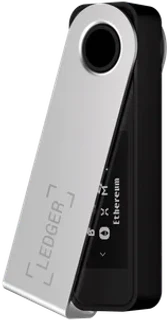

Ledger in 2026: models, position and who they suit
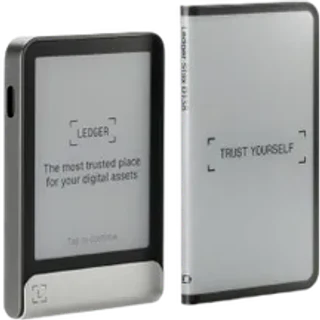
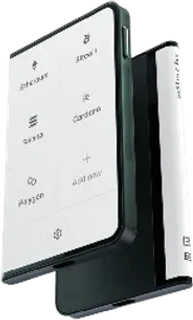
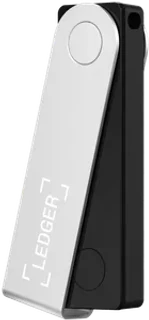
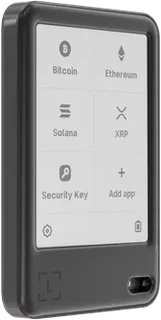
Ledger, based in France, is an established hardware-wallet manufacturer for both beginners and experienced users. Its range includes the button-operated Nano S Plus and Nano X, plus the E Ink touchscreen Nano Gen5, Flex and Stax. These models suit different budgets and workflows, from occasional desktop signing to mobile use and larger transaction displays. Prices depend on the model, destination and bundle. The model list shows the manufacturer's USD base offers observed on October 1, 2026; check the current U.S. checkout price before ordering.
The core approach is to isolate signing keys on a dedicated device, sign transactions locally and require physical approval on the wallet. This can reduce exposure to malware on a computer or phone compared with a software-only wallet. Ledger combines the device with its companion app, now branded Ledger Wallet and formerly Ledger Live. Depending on the asset, integration and location, that app can provide access to DeFi, NFTs and staking services in one interface. This combination of signing hardware and app integration is an important part of its appeal, although each connected service brings separate risks.
Ledger also has trust and security controversies to consider: parts of Ledger OS are closed source, Ledger Recover introduces an optional recovery-service trust model, and the 2023 Connect Kit incident exposed a software-integration risk. A useful assessment should cover both the device architecture and these wider risks. This article adapts the original German editorial review; it does not claim a new U.S. hands-on test.
Ledger security: Secure Element, threat model and limits
Ledger devices use a Secure Element to isolate sensitive key operations. The chip certification depends on the model: Stax, Flex, Nano Gen5 and Nano S Plus list an EAL6+ chip, while Nano X lists EAL5+. In the ordinary signing workflow, the device creates signatures rather than giving the host computer its private keys. That is an important boundary when the host is compromised. It is not an absolute guarantee against every firmware, recovery-service, physical or integration attack, and a chip certificate does not certify the whole user workflow.
Hardware wallets reduce some risks rather than eliminating them. Attackers may instead use phishing, fake apps, misleading transaction prompts or compromised distribution channels. The physical approval step therefore matters: check the destination, amount and supported transaction details on the device display, rather than trusting only the computer screen. A correct cryptographic signature can still authorize a harmful transaction if the user approves the wrong details or grants unsafe permissions.
The 2023 Connect Kit incident affected a software integration rather than constituting a disclosed break of the device's Secure Element. This distinction matters: strong signing hardware can coexist with vulnerable connected software or a malicious front end. Treat the device as one security boundary within a broader process. Official software, careful transaction review and restricted app permissions remain necessary even when the keys are held on hardware.
Setup and onboarding: start with a repeatable process
A beginner can set up a Ledger device, but the recovery process deserves careful attention. In a recovery-phrase setup, the phrase restores access if the device is lost or fails, provided it is intact and compatible with the replacement wallet. Someone who obtains that phrase can also control the associated assets. The physical device is therefore only part of the system: the security and availability of the backup are just as important.
Use a staged setup: obtain the device from the manufacturer or an authorized retailer, follow the official authenticity and firmware checks, create recovery material through the intended device workflow, and verify the recovery path before funding it substantially. A small receive-and-send test helps reveal address, network and app misunderstandings. Test recovery according to the manufacturer's instructions while the wallet is still empty or holds only a small amount. Never erase your only working setup before verifying that recovery is possible.
The official Ledger app guides many setup steps, but it does not remove personal responsibility. Do not type recovery words into a computer, a website or an ordinary support form. Do not photograph them into cloud storage or share them through email or messaging. Use the intended hardware recovery flow and protect any additional recovery service according to its own requirements. These habits help preserve the isolation that the hardware is designed to provide.
The Ledger app: DeFi, NFTs, staking and swaps
The companion app is the main interface for many users: it manages accounts, displays supported assets and prepares transactions for device approval. Additional services can include staking, swaps and NFT-related functions, depending on the asset and integration. Having these workflows in one interface can be convenient, particularly for readers who prefer fewer separate wallet applications. Availability, fees and eligibility belong to each underlying service; owning a Ledger device does not establish that a service is available in your U.S. state.
Asset support also needs a precise interpretation. Ledger distinguishes assets available in its own app from those reached through third-party wallets. Support for a network or token does not imply identical signing visibility, feature coverage or user experience across all integrations. Check the exact asset, network and required app before receiving funds. For an unfamiliar asset, test the intended receive-and-send workflow with a small amount instead of relying on a headline count of supported coins.
Staking can interest long-term holders, but it is not risk-free income. Consider the network's reward rules, any slashing or lockup conditions, fees and U.S. tax consequences. For the basic terminology, start with the beginner guide. The app may simplify access, but you remain responsible for evaluating the provider and the transaction you approve.
Ledger Recover, closed source and trust choices
Ledger Recover illustrates why a wallet's trust model extends beyond cryptography. An optional recovery service may offer a useful additional recovery path, while also introducing identity checks, service terms and reliance on third parties. These preferences differ between users. Understand which recovery features you have chosen, the devices and locations they support, and what is required to regain access. A recovery service should never be confused with a guarantee against phishing, mistaken transfers or every possible loss.
The closed parts of Ledger OS limit independent inspection of the full device software. Open-source advocates emphasize inspectability; Ledger emphasizes its hardware and operating-system security architecture. The practical decision is about which trust assumptions fit your threat model. Published source, chip certification, vendor reputation and operational controls each answer different questions. None is a substitute for understanding the complete recovery and signing process you intend to use.
Keep a clear operating routine: reduce unnecessary integrations, use official software, inspect device prompts and review your backup and recovery arrangements periodically. Separate sensitive wallet activity from careless browsing or software installation. Brand recognition does not prevent a user from approving a malicious transaction. The device is most useful when its confirmation and recovery features are part of a process you understand and can repeat.
Ledger models: physical buttons and touchscreens
Choose a model around the way you intend to use it, rather than price alone. Nano S Plus is a USB-only option for compatible computers and Android devices and does not support iOS. Nano X adds Bluetooth for compatible mobile use. Nano Gen5, Flex and Stax offer larger E Ink touchscreens, with different size and design priorities. Check the exact operating-system requirements and connection method before choosing; the models are not interchangeable in every mobile workflow.
No model can compensate for an exposed backup or careless approval of a transaction. An expensive display does not remove the need to read the destination and amount. Conversely, a simpler device can suit a limited workflow if its screen, recovery process and supported assets meet your needs. The useful question is which device supports a process you can follow consistently, including when you need to recover access under stress.
For a broader comparison of signing devices, the wallet comparison covers operation, security approach and features across manufacturers. Ledger offers a substantial app ecosystem and broad third-party integrations. Other manufacturers place different emphasis on software openness, recovery methods or a smaller supported feature set. Compare the actual model and asset support rather than assuming that one brand is the best fit for every reader.
Ledger strengths and limitations in practice
Strengths: A range of signing devices, Secure Element protection, broad app integration and different display formats give readers several ways to organize self-custody. The companion app can connect basic account management with more advanced supported on-chain services. Button-operated and touchscreen devices also offer different levels of convenience. Verify each service and asset independently, especially when U.S. state restrictions or a third-party app determine availability.
Limitations: The closed portions of Ledger OS and the trust assumptions of optional recovery services deserve consideration. The Connect Kit incident is also a reminder that connected software can create risks outside the signing chip. Readers who require a more inspectable software stack may prefer an alternative. The breadth of an ecosystem adds convenience, but also increases the number of integrations and permissions a user must evaluate.
Assessment: Ledger can suit readers who want hardware signing across a broad asset and app ecosystem and who are willing to maintain disciplined backup and approval practices. A reader with a strictly open-source threat model may make a different choice. Consider the actual device architecture, recovery options and supported transaction display alongside the editorial reference score. Your operating routine remains part of the security boundary.
A practical workflow: purchase, setup and long-term custody
A device is the start of a repeatable process, not the complete process itself. Buy from the manufacturer or an authorized retailer, check authenticity through official instructions and reject a device supplied with a prewritten recovery phrase. Create recovery material through the intended device workflow and secure the backup physically. Keep backups separate from the signing device and understand who can access each location and what you will need during recovery.
Next, test receiving, sending and the manufacturer-supported recovery procedure with an empty wallet or a small balance. A recovery check can reveal mistakes before the wallet holds a larger amount. If you trade actively, consider separating everyday transaction activity from long-term custody. For a trading account, the exchange comparison can help you assess U.S. eligibility and the account workflow, while the hardware wallet provides a separate self-custody process for assets you control directly.
Review the routine periodically: check the backup's condition and accessibility, remove unused app integrations, verify software sources and approve transactions only after reading the device display. A quarterly review can be a useful reminder, but review sooner after a change in device, location or recovery setup. Consistency matters more than relying on the manufacturer's name. Ledger is a tool within that process, with both useful features and specific trust assumptions.
Common questions
Frequently asked questions
Is Ledger still secure in 2026?
What ongoing costs does Ledger have?
Is Ledger suitable for beginners?
Which alternatives to Ledger should I compare?
How do U.S. taxes apply to Ledger transactions?
How can Ledger support help if something goes wrong?
Conclusion: Ledger in 2026
Ledger can suit self-custody users who need broad asset support and a developed companion-app ecosystem. Secure Element protection, model variety and on-device confirmation are useful parts of that setup. Closed portions of Ledger OS, optional recovery-service trust assumptions and connected-software risks remain relevant limitations. Use official software, protect and verify recovery material, and read transaction details on the signing device. Readers who prioritize software inspectability may prefer other manufacturers. Choose the model and process around your actual needs rather than treating any hardware wallet as a guarantee against loss.