
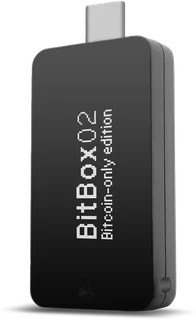
Asset and device support
XRP: Not supported. Choose a different wallet if you need native XRP custody.
Connection: USB-C; USB-A adapter supplied
Check compatibility with your exact operating system before ordering. Software integrations and supported networks can change.
How recovery works
microSD backup; optional BIP39 recovery words
Keep recovery material outside messages, browser forms and cloud photos. The backup controls access; the device alone is not the full recovery plan.
Plan a recovery backup →Strengths and limits
What the model offers
- Open-source firmware
- microSD backup workflow
- Multi or Bitcoin-only edition
Check before buying
- Does not support XRP or Solana
- No iPhone or iPad support
- The editions cannot be converted later
US purchase availability
The manufacturer serves US buyers and markets this model. That is not a guarantee of inventory, a delivery date, a US dollar price or access to integrated exchange services. Check the final checkout with your delivery address.
Set up the recovery plan before funding
Buy this model through the manufacturer or an authorized seller and follow the current instructions for the exact edition. Packaging appearance alone does not establish that a device is genuine. Use the manufacturer’s authenticity checks and official software, initialize the wallet yourself and reject a device supplied with a prewritten recovery phrase.
Follow the device’s own initialization and recovery procedure. If it generates a phrase, write it down exactly and verify it through the manufacturer’s recommended on-device process. The word list, word count and backup format depend on the model and chosen setup; do not substitute a generic recovery workflow.
The recovery material can control funds independently of the original device. Keep it offline and protect it against theft as well as damage. Store a separate explanation of the backup format and any extra passphrase without making a single stolen document sufficient to recover everything.
Check recovery while the wallet is still empty using the manufacturer’s supported procedure. Do not reset your only funded signing device to experiment. If you choose an extra passphrase, confirm that you can reproduce the intended wallet: a different passphrase can open a different account without telling you it was a typing error.
Receive XRP and verify the destination
BitBox02 does not support native XRP in the verified catalog. Do not send XRP to a different asset account or assume an integrated trading service changes the hardware’s asset support. Use the XRP filter in the comparison to select a compatible model.
What the hardware protects during everyday use
The wallet is a signing tool. It can help isolate signing keys, but you still choose which transaction to authorize. Verify the destination, asset, network and requested amount. A genuine device cannot make a malicious recipient safe or cancel a completed transfer.
Use official update channels and review the device instructions before a firmware update. Keep the recovery plan accessible without exposing it to the computer used for the update. Do not enter recovery words into a website after an error message or a message from someone claiming to offer support.
Consider your everyday equipment before ordering: USB-C; USB-A adapter supplied. Confirm support for the exact phone or computer, browser integration and assets you plan to use. Buying the hardware does not establish US eligibility for an integrated buy, sell or swap provider. Those services have their own account rules, fees and regional restrictions.
Before selling or disposing of the device, move funds where necessary, verify your recovery access and follow the manufacturer’s reset procedure. Do not hand over a device or backup material that still controls your wallet.
Read the complete setup guide →Sources & limits
Source review: Oct 1, 2026. Availability and provider terms can change.